
1. Docker
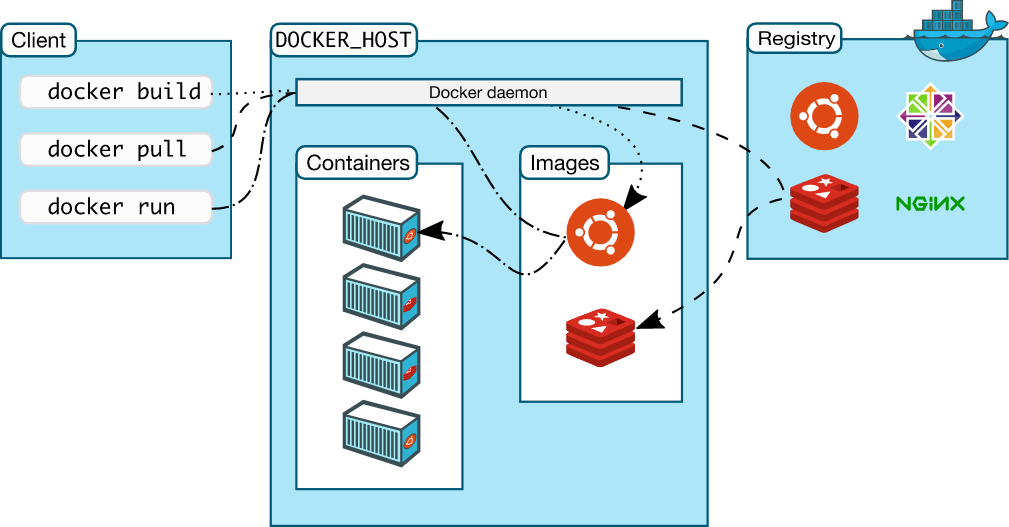
The client operates images and containers through the docker daemon running on the host, and the registry provides image publishing and downloading (similar to npm and pip).
A Docker image is a special read-only file system that provides programs, libraries, resources, configuration files, and other files required for container runtime. It also contains some configuration parameters prepared for runtime (such as anonymous volumes, environment variables, users, etc.). The image does not contain any dynamic data, and its content will not change after being built.
A Container is a running instance of an image, running as a special process on the host machine. One image can have multiple containers.
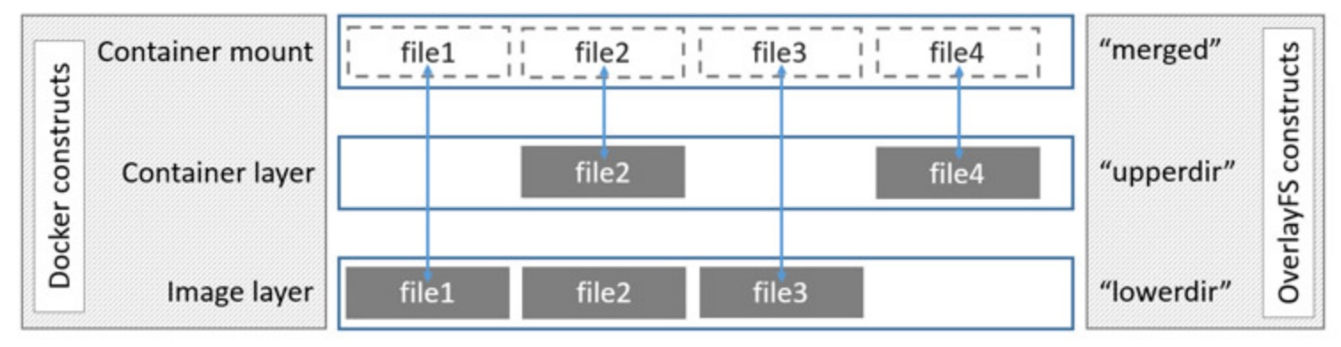
Container adds a read-write layer on top of the Image. After doing some write operations inside the container, you can commit the read-write layer to generate a new image.
The above image omits the init layer that stores configuration file information. The init layer is located between the image and container layers in the above image. It stores some directories/files that need to be written when running the operating system, such as the /etc directory. The init layer is not committed. Because it’s unnecessary - the init layer content is automatically generated every time the read-only layer runs.
1.1. Commands
# Image
docker pull hello-world   Download hello-world image from registry
docker images             View local images
docker rmi  <IMAGE ID>    Delete an image, can use just the first few digits

# Container
docker ps -a              View all containers
docker run -it centos     Run interactively
docker run -d flask-hello-world  Run in background
docker start <container_name>   Restart
docker rm <CONTAINER ID>    Delete container
docker rm $(docker container ls -aq)   Delete all containers
docker port <CONTAINER ID>  View port mapping information
docker cp local_file_name  49f7960eb7e4:/docker_file_name  Copy file into docker
docker attach <container name>  For containers started with docker run/start, can attach to console to view output.
docker exec -it  directus-sqlite /bin/sh  Execute sh inside container named directus-sqlite
1.2. Dockerfile
A configuration file used to build images, starting from a base image, running a series of configuration commands to get another image
2. Docker Compose
A tool for defining, running, and managing multiple containers. After running, you can also use previous docker commands to operate containers.
docker-compose up
docker-compose up -d  // Start and run containers in background
docker-compose ps
docker-compose logs  // View logs for each service
docker-compose port directus 8055   // See which host port the directus service's container 8055 is bound to
docker-compose start cache
docker-compose stop cache
docker-compose run directus sh   // Run sh on the directus service's container
docker-compose down  // Stop all services and delete containers
3. Examples
3.1. Docker
3.1.1. Directus
The following maps two volumes, reads environment variables, then runs directus interactively, with container name directus-sqlite.
docker run -it --env-file=./env_sqlite -v $PWD/:/directus/database -v $PWD/uploads:/directus/uploads --name="directus-sqlite" directus/directus:latest
Where the environment variable file env_sqlite
DB_CLIENT="sqlite3"
DB_FILENAME="/directus/database/data.db"

RATE_LIMITER_ENABLED=true
RATE_LIMITER_POINTS=50
RATE_LIMITER_DURATION=1
RATE_LIMITER_STORE=memory

CACHE_ENABLED=true
CACHE_TTL="30m"
CACHE_NAMESPACE="directus-cache"
CACHE_AUTO_PURGE=true

# memory | redis | memcache
CACHE_STORE=memory

ASSETS_CACHE_TTL="30m"

STORAGE_LOCATIONS="local"
STORAGE_LOCAL_DRIVER="local"
STORAGE_LOCAL_ROOT="/directus/uploads"

KEY="xxxxxxx-xxxxxx-xxxxxxxx-xxxxxxxxxx"
SECRET="abcdef"
ACCESS_TOKEN_TTL="15m"
REFRESH_TOKEN_TTL="7d"
REFRESH_TOKEN_COOKIE_SECURE="false"
REFRESH_TOKEN_COOKIE_SAME_SITE="lax"
REFRESH_TOKEN_COOKIE_NAME="directus_refresh_token"

CORS_ENABLED="true"
CORS_ORIGIN="true"
CORS_METHODS=GET,POST,PATCH,DELETE
CORS_ALLOWED_HEADERS=Content-Type,Authorization
CORS_EXPOSED_HEADERS=Content-Range
CORS_CREDENTIALS="true"
CORS_MAX_AGE=18000

AUTH_PROVIDERS="dingtalk"

AUTH_DINGTALK_DRIVER="oauth2"
AUTH_DINGTALK_CLIENT_ID="...."
AUTH_DINGTALK_CLIENT_SECRET="c6rCTM1nmIm-...."
AUTH_DINGTALK_AUTHORIZE_URL="https://fb.....cn/apipro/oauth_dingtalk/auth"
AUTH_DINGTALK_ACCESS_URL="https://fb.....cn/apipro/oauth_dingtalk/access_token"
AUTH_DINGTALK_PROFILE_URL="https://fb.....cn/apipro/oauth_dingtalk/profile"
AUTH_DINGTALK_ALLOW_PUBLIC_REGISTRATION="true"
AUTH_DINGTALK_DEFAULT_ROLE_ID="86a3338c-26a5-447d-bfbd-f938ee2c3c40"
AUTH_DINGTALK_ICON="alipay"

EXTENSIONS_PATH="./extensions"

EMAIL_FROM="[email protected]"
EMAIL_TRANSPORT="smtp"

EMAIL_SMTP_POOL=false
EMAIL_SMTP_HOST="smtp........com"
EMAIL_SMTP_PORT=465
EMAIL_SMTP_SECURE=true # Use TLS
EMAIL_SMTP_IGNORE_TLS=false
EMAIL_SMTP_USER="[email protected]"
EMAIL_SMTP_PASSWORD="...."
Later, you can use docker start to start directus.
MacBook-Pro-2:api wangxu$ docker ps -a
CONTAINER ID   IMAGE                      COMMAND                  CREATED         STATUS                     PORTS     NAMES
78acc6c46440   directus/directus:latest   "docker-entrypoint.s…"   6 minutes ago   Exited (1) 5 minutes ago             directus-sqlite
MacBook-Pro-2:api wangxu$ docker start directus-sqlite
directus-sqlite
MacBook-Pro-2:api wangxu$
3.1.2. Basic Operations
MacBook-Pro-2:apiproxy wangxu$ docker images
REPOSITORY   TAG       IMAGE ID   CREATED   SIZE

MacBook-Pro-2:apiproxy wangxu$ docker pull nginx
Using default tag: latest
latest: Pulling from library/nginx
279a020076a7: Pull complete
ef0e42ecde96: Pull complete
5b148f48f52e: Pull complete
5596027e469a: Pull complete
a7c9963870b9: Pull complete
efce21e16a59: Pull complete
Digest: sha256:1c13bc6de5dfca749c377974146ac05256791ca2fe1979fc8e8278bf0121d285
Status: Downloaded newer image for nginx:latest
docker.io/library/nginx:latest

MacBook-Pro-2:apiproxy wangxu$ docker images
REPOSITORY   TAG       IMAGE ID       CREATED      SIZE
nginx        latest    9c1ff20ac9c9   6 days ago   134MB

MacBook-Pro-2:apiproxy wangxu$ docker run -it nginx
/docker-entrypoint.sh: /docker-entrypoint.d/ is not empty, will attempt to perform configuration
/docker-entrypoint.sh: Looking for shell scripts in /docker-entrypoint.d/
/docker-entrypoint.sh: Launching /docker-entrypoint.d/10-listen-on-ipv6-by-default.sh
10-listen-on-ipv6-by-default.sh: info: Getting the checksum of /etc/nginx/conf.d/default.conf
10-listen-on-ipv6-by-default.sh: info: Enabled listen on IPv6 in /etc/nginx/conf.d/default.conf
/docker-entrypoint.sh: Launching /docker-entrypoint.d/20-envsubst-on-templates.sh
/docker-entrypoint.sh: Launching /docker-entrypoint.d/30-tune-worker-processes.sh
/docker-entrypoint.sh: Configuration complete; ready for start up
2022/03/08 08:55:20 [notice] 1#1: using the "epoll" event method
2022/03/08 08:55:20 [notice] 1#1: nginx/1.21.6
2022/03/08 08:55:20 [notice] 1#1: built by gcc 10.2.1 20210110 (Debian 10.2.1-6)
...
^C2022/03/08 08:55:43 [notice] 1#1: signal 2 (SIGINT) received, exiting
2022/03/08 08:55:43 [notice] 32#32: signal 2 (SIGINT) received, exiting
2022/03/08 08:55:43 [notice] 31#31: signal 2 (SIGINT) received, exiting
2022/03/08 08:55:43 [notice] 32#32: exiting
2022/03/08 08:55:43 [notice] 31#31: exiting
2022/03/08 08:55:43 [notice] 1#1: signal 17 (SIGCHLD) received from 31
2022/03/08 08:55:43 [notice] 1#1: worker process 31 exited with code 0
2022/03/08 08:55:43 [notice] 1#1: signal 29 (SIGIO) received
2022/03/08 08:55:43 [notice] 1#1: signal 17 (SIGCHLD) received from 32
2022/03/08 08:55:43 [notice] 1#1: worker process 32 exited with code 0
2022/03/08 08:55:43 [notice] 1#1: exit


MacBook-Pro-2:apiproxy wangxu$ docker ps -a
CONTAINER ID   IMAGE     COMMAND                  CREATED          STATUS                      PORTS     NAMES
12f3e6edb2bb   nginx     "/docker-entrypoint.…"   44 seconds ago   Exited (0) 20 seconds ago             objective_goodall

MacBook-Pro-2:apiproxy wangxu$ docker run -d nginx
9cfb02db055ef4b05e3eb60eed0a0d3f4dd846f8aedf5973a9ecf26b3ad63c91

MacBook-Pro-2:apiproxy wangxu$ docker ps -a
CONTAINER ID   IMAGE     COMMAND                  CREATED              STATUS                      PORTS     NAMES
9cfb02db055e   nginx     "/docker-entrypoint.…"   6 seconds ago        Up 5 seconds                80/tcp    tender_mclaren
12f3e6edb2bb   nginx     "/docker-entrypoint.…"   About a minute ago   Exited (0) 45 seconds ago             objective_goodall

MacBook-Pro-2:apiproxy wangxu$ docker stop tender_mclaren
tender_mclaren

MacBook-Pro-2:apiproxy wangxu$ docker ps -a
CONTAINER ID   IMAGE     COMMAND                  CREATED              STATUS                          PORTS     NAMES
9cfb02db055e   nginx     "/docker-entrypoint…"   52 seconds ago       Exited (0) 7 seconds ago                  tender_mclaren
12f3e6edb2bb   nginx     "/docker-entrypoint…"   About a minute ago   Exited (0) About a minute ago             objective_goodall

MacBook-Pro-2:apiproxy wangxu$ docker start tender_mclaren
tender_mclaren

MacBook-Pro-2:apiproxy wangxu$ docker ps -a
CONTAINER ID   IMAGE     COMMAND                  CREATED              STATUS                     PORTS     NAMES
9cfb02db055e   nginx     "/docker-entrypoint…"   About a minute ago   Up 4 seconds               80/tcp    tender_mclaren
12f3e6edb2bb   nginx     "/docker-entrypoint…"   2 minutes ago        Exited (0) 2 minutes ago             objective_goodall

MacBook-Pro-2:apiproxy wangxu$ docker stop tender_mclaren
tender_mclaren

MacBook-Pro-2:apiproxy wangxu$ docker rm $(docker container ls -aq)
9cfb02db055e
12f3e6edb2bb

MacBook-Pro-2:apiproxy wangxu$ docker ps -a
CONTAINER ID   IMAGE     COMMAND   CREATED   STATUS    PORTS     NAMES

MacBook-Pro-2:apiproxy wangxu$ docker images
REPOSITORY   TAG       IMAGE ID       CREATED      SIZE
nginx        latest    9c1ff20ac9c9   6 days ago   134MB

MacBook-Pro-2:apiproxy wangxu$ docker rmi  9c
Untagged: nginx:latest
Untagged: nginx@sha256:1c13bc6de5dfca749c377974146ac05256791ca2fe1979fc8e8278bf0121d285
Deleted: sha256:9c1ff20ac9c94dd5175ea7395ed94f259f7a9c804af9312022cb95b2fcf36367
Deleted: sha256:c0672bb6f00fab41504c93ff2bf5d030cb32422bbd4a447046ebb9a66150ec8a
Deleted: sha256:abefcde7649be3e1c8217eb1b65cf0546da51cb7e32db17a0c4f0a6a3c0c6918
Deleted: sha256:0f0cbdccb38c3536f3dcb500171ef9ee0e55e869f8db8b51a792ab7b398a9e01
Deleted: sha256:7fd3f181e6f8099e4dd631d17fe371801691d46a949551fcba4c866b854dfbfb
Deleted: sha256:1f90b81070395a47995dfee2a8e055da3871ded2fab037129b40442d46678c4b
Deleted: sha256:5089aa3c97a8aebeac8ad0cb2d089f8e7e487f0299a248f34cf46ab86a1a356d

MacBook-Pro-2:apiproxy wangxu$ docker images
REPOSITORY   TAG       IMAGE ID   CREATED   SIZE
MacBook-Pro-2:apiproxy wangxu$
3.2. Docker Compose
3.2.1. directus docker-compose.yaml
version: '3'
services:
  database:
    container_name: database
    image: postgis/postgis:13-master
    volumes:
      - ./data/database:/var/lib/postgresql/data
    networks:
      - directus
    environment:
      POSTGRES_USER: 'directus'
      POSTGRES_PASSWORD: 'directus'
      POSTGRES_DB: 'directus'

  cache:
    container_name: cache
    image: redis:6
    networks:
      - directus

  directus:
    container_name: directus
    image: directus/directus:latest
    ports:
      - 8055:8055
    volumes:
      # By default, uploads are stored in /directus/uploads
      # Always make sure your volumes matches the storage root when using
      # local driver
      - ./uploads:/directus/uploads
      # Make sure to also mount the volume when using SQLite
      # - ./database:/directus/database
      # If you want to load extensions from the host
      # - ./extensions:/directus/extensions
    networks:
      - directus
    depends_on:
      - cache
      - database
    environment:
      KEY: '255d861b-5ea1-5996-9aa3-922530ec40b1'
      SECRET: '6116487b-cda1-52c2-b5b5-c8022c45e263'

      DB_CLIENT: 'pg'
      DB_HOST: 'database'
      DB_PORT: '5432'
      DB_DATABASE: 'directus'
      DB_USER: 'directus'
      DB_PASSWORD: 'directus'

      CACHE_ENABLED: 'true'
      CACHE_STORE: 'redis'
      CACHE_REDIS: 'redis://cache:6379'

      ADMIN_EMAIL: '[email protected]'
      ADMIN_PASSWORD: 'd1r3ctu5'

      # Make sure to set this in production
      # (see https://docs.directus.io/configuration/config-options/#general)
      # PUBLIC_URL: 'https://directus.example.com'

networks:
  directus:
3.2.2. Basic Operations
MacBook-Pro-2:docker wangxu$ docker-compose up -d
Docker Compose is now in the Docker CLI, try `docker compose up`

Creating network "docker_directus" with the default driver
Creating database ... done
Creating cache    ... done
Creating directus ... done

MacBook-Pro-2:docker wangxu$ docker ps -a
CONTAINER ID   IMAGE                       COMMAND                  CREATED          STATUS          PORTS                                       NAMES
8406414e46ee   directus/directus:latest    "docker-entrypoint.s…"   13 seconds ago   Up 10 seconds   0.0.0.0:8055->8055/tcp, :::8055->8055/tcp   directus
de6b976608a6   postgis/postgis:13-master   "docker-entrypoint.s…"   16 seconds ago   Up 13 seconds   5432/tcp                                    database
566013da3d6c   redis:6                     "docker-entrypoint.s…"   16 seconds ago   Up 13 seconds   6379/tcp                                    cache

MacBook-Pro-2:docker wangxu$ docker-compose down
Stopping directus ... done
Stopping database ... done
Stopping cache    ... done
Removing directus ... done
Removing database ... done
Removing cache    ... done
Removing network docker_directus
MacBook-Pro-2:docker wangxu$ docker ps -a
CONTAINER ID   IMAGE     COMMAND   CREATED   STATUS    PORTS     NAMES
MacBook-Pro-2:docker wangxu$